eLearning
  • Home
  • About Us
  • Recent Posts
  • DLS Digest
  • Contact Us
  • Click to open the search input field Click to open the search input field Search
  • Menu Menu
  • Link to X

Latest News
Everything thats going on at Enfold is collected here

Hey there! We are Enfold and we make really beautiful and amazing stuff.
This can be used to describe what you do, how you do it, & who you do it for.

WeVideo Certifications and Ambassador Programs

Classroom Tools, DLS, DLS Digest

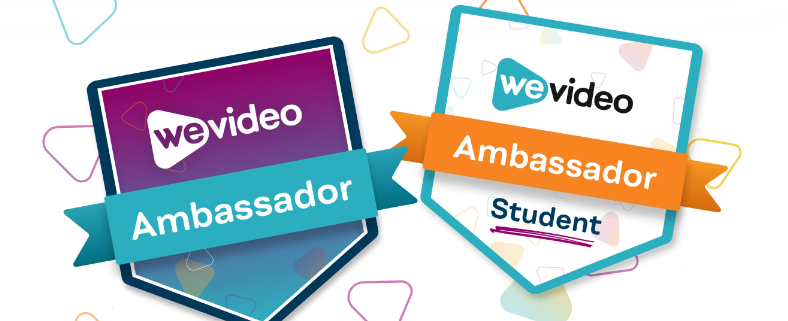
Whether you’re a WeVideo newbie looking to learn the ropes, or a seasoned pro ready to flaunt your skills — jump in! Become a WeVideo aficionado, plus receive a certificate of completion.  Those certifications build upon each other as well.  Continue your learning to become a WeVideo Ambassador.  There are even certification courses for your students!


To learn more about WeVideo certifications and ambassador programs please visit:

WeVideo Certifications

WeVideo Ambassador

November 7, 2024/by Danica Boykin
https://elearning.hallco.org/wp-content/uploads/2024/11/WeVideo-Ambassador-Programs.png 284 394 Danica Boykin https://elearning.hallco.org/wp-content/uploads/2021/04/eLearningLogoPNG.png Danica Boykin2024-11-07 11:05:212024-11-07 11:05:21WeVideo Certifications and Ambassador Programs

Classwize Focus Library Now Live

Classwize, DLS, DLS Digest

We are excited to announce that our newest Classwize feature, “Focus Library,” is now live for all Classwize users! Focus Library will allow teachers to create Focus Plans ahead of time, use the Focus Plan with any class in their Classwize dashboard, and save Focus Plans created in the moment for future use! Please view the video overview & resources below for more information and share them with your teachers!

Classwize Focus Library

Create a Focus Plan

Apply a Focus Plan

Manage a Focus Plan

October 22, 2024/by Gregory Odell
https://elearning.hallco.org/wp-content/uploads/2024/10/Classwize-Focus-Library-Featured-Image-1.png 284 394 Gregory Odell https://elearning.hallco.org/wp-content/uploads/2021/04/eLearningLogoPNG.png Gregory Odell2024-10-22 08:42:412024-10-22 08:48:04Classwize Focus Library Now Live

ClearTouch Troubleshooting

ClearTouch, DLS Digest, Uncategorized

A ClearTouch Technial Q & A Session was held at the ISC on Friday, October 4th.  Our friends at Nisewonger AV created and shared this excellent ClearTouch troubleshooting PowerPoint:

Click the link below to download a copy of the presentation.

NAVC-Cleartouch TST_TSA Presentation

Thank you to Nisewonger AV for preparing these slides, and we hope you find this resource helpful in your ClearTouch troubleshooting efforts.

October 8, 2024/by Gregory Odell
https://elearning.hallco.org/wp-content/uploads/2024/10/ClearTouch-Troubleshooting.png 284 394 Gregory Odell https://elearning.hallco.org/wp-content/uploads/2021/04/eLearningLogoPNG.png Gregory Odell2024-10-08 09:00:422024-10-08 09:00:42ClearTouch Troubleshooting

Smart Search Now Available in Canvas

AI, Canvas, DLS Digest

Canvas Smart Search

The Smart Search feature is now available for teachers to enable in their Canvas courses. Below is how Instructure defines the Smart Search functionality:

“Our Smart Search feature relies on an AI-adjacent technology called ’embeddings.’ This technology “reads” the course content and creates a complex mathematical representation of each piece of content. When you perform a search, the technology ‘reads’ your query and converts it into a complex mathematical representation. The tool then compares the mathematical representations of both your search and course content to return relevant results; this result is returned with a ‘Confidence’ rating.”

As of June 1, 2024, searchable items include content pages, announcements, discussion prompts, and assignment descriptions, with plans to expand.

We feel it is important to note this feature is designed to respect course permissions. In other words, if your students are not able to access files in your course prior to enabling the Smart Search feature students should also not be able to search for and access those files after the feature is enabled.

Enabling Smart Search in a Course:

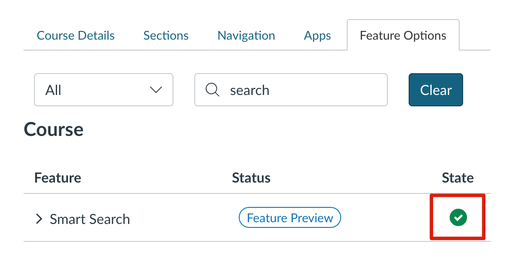
  1. Navigate to Course Settings > Feature Options
  2. Enable the Smart Search feature option
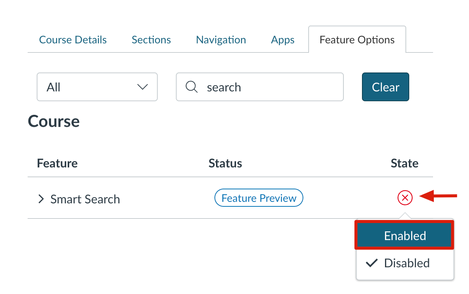
Once the teacher has enabled the feature it is up to the teacher if they want to add Smart Search to the course navigation. The teacher will still be able to access Smart Search even if it is not added to the course navigation for students. Please see the link here about managing course navigation links if teacher wants to enable Smart Search in the course navigation.

We hope you all enjoy the new Smart Search feature in Canvas, and for all of the detailed information please see the Help Guide here.

September 25, 2024/by Gregory Odell
https://elearning.hallco.org/wp-content/uploads/2024/09/Canvas-Updates-Smart-Search.png 284 394 Gregory Odell https://elearning.hallco.org/wp-content/uploads/2021/04/eLearningLogoPNG.png Gregory Odell2024-09-25 09:48:032024-09-25 12:42:25Smart Search Now Available in Canvas

Updates to Read&Write

Classroom Tools, DLS, DLS Digest

Latest Updates for Read&Write are LIVE! 

Read&Write is a dynamic Chrome Extension Available for all members of Hall County Schools to support literacy.  The tool can help with everyday tasks such as reading text aloud, understanding unfamiliar words, and even researching assignments.

In July 2024, Read&Write added additional features to their product that include:

  • Co:Writer Prediction: This will provide the strongest, and most accurate word prediction available on the market. It includes a simple-to-use word prediction engine, specifically designed to free up ideas so they more naturally flow into writing – helping to overcome writer’s block and word recall issues.
  • Topics: With Topics, students get topic-specific vocabulary at their fingertips – no more struggling with complex terms. Just a few clicks or keystrokes unlock content-specific words, boosting writing efficiency.
  • To ease the transition and cater to individual preferences, Read&Write will offer three different toolbar modes:
    • Horizontal Mode: The familiarity of the current Read&Write toolbar, with a few small changes. Toolbar sits at the top of the screen and is fully customizable.
    • Vertical Mode: Toolbar is docked on the right hand side of the screen. It’s customizable too, so students can add icons from Read&Write toolbar as desired.
    • Writing Mode: Ideal for students who primarily need writing support and may get overwhelmed with a toolbar with many different features.

The Read&Write Feature Tour is a great resource for teachers and students that shows videos of how to use each item on the Read&Write Tool Bar.

To find additional training guides and webinars (live and on-demand), please visit the Texthelp Academy .

September 18, 2024/by Danica Boykin
https://elearning.hallco.org/wp-content/uploads/2024/09/ReadWrite-1.png 284 394 Danica Boykin https://elearning.hallco.org/wp-content/uploads/2021/04/eLearningLogoPNG.png Danica Boykin2024-09-18 14:35:352024-09-18 15:50:19Updates to Read&Write

Using Book Creator with Canvas

Book Creator, Canvas, DLS, DLS Digest

Did you know Book Creator revamped their Canvas integration early in 2024?

Prior to 2024 the Book Creator / Canvas integration was primarily just single-sign-on.  The features below are now included in the new integration:

  • Create Book Creator assignments in Canvas:

  • Let students turn in Book Creator books directly from Canvas:

  • Read and grade student work from Canvas:

Read all of the details of how to use Book Creator with Canvas here and how to improve your Canvas/Book Creator workflows here.

Also, the video below provides an excellent view of the new integration features as well:

September 10, 2024/by Gregory Odell
https://elearning.hallco.org/wp-content/uploads/2024/09/Book-Creator-with-Canvas.png 284 394 Gregory Odell https://elearning.hallco.org/wp-content/uploads/2021/04/eLearningLogoPNG.png Gregory Odell2024-09-10 08:53:322024-09-10 09:40:57Using Book Creator with Canvas
Page 5 of 14«‹34567›»
  • Blog Classic Grid
  • Blog Fullwidth
  • Blog Masonry
  • Blog Multi Author
  • Blog Single Author Big
  • Blog Single Author Small

Search e-Learning Archives

Search Search

e-Learning Categories

  • AI
  • All Posts
  • Book Creator
  • Canva
  • Canvas
  • Classroom Tools
  • Classwize
  • ClearTouch
  • Content
  • Digital Content Creation
  • DLS
  • DLS Digest
  • Featured
  • Google
  • Kami
  • Microsoft
  • Mobile Devices
  • ParentSquare
  • Productivity
  • Professional Learning
  • Uncategorized
  • Zoom

e-Learning Archives

  • October 2026
  • September 2026
  • August 2026
  • July 2026
  • May 2026
  • September 2025
  • August 2025
  • July 2025
  • May 2025
  • February 2025
  • January 2025
  • December 2024
  • November 2024
  • October 2024
  • September 2024
  • August 2024
  • July 2024
  • May 2024
  • May 2023
  • September 2022
  • August 2022
  • July 2022
  • April 2022
  • January 2022
  • December 2021
  • November 2021
  • September 2021
  • July 2021
  • March 2021
  • January 2021
  • December 2020
  • June 2020
  • May 2020
  • February 2020
  • January 2020
  • October 2019
  • September 2019
  • August 2019
  • May 2019
  • April 2019
  • March 2019
  • January 2019
  • October 2018
  • September 2018
  • August 2018
  • July 2018
  • May 2018
  • April 2018
  • January 2018

Where To Find Us

Hall County Schools Instructional Support Center

2750 Atlanta Highway
Gainesville, GA 30504

Phone: 770-534-6313

All e-Learning Content

Recent Posts

Our Office Hours

Mo-Fr: 8:00-19:00
Sa: 8:00-14:00
So: closed

2026 © Copyright: eLearning | Hall County Schools
  • Link to X
Scroll to top Scroll to top Scroll to top